Home > Software > Tools > Screenshots > Snipaste

Details
- Package ID
- snipaste
- Version
- 2.11.3
- Downloads
- 5164
- Website
- https://www.snipaste.com/
Summary
Snipaste is a simple but powerful snipping tool
Description
Boost your productivity with Snipaste
Snipaste is a simple but powerful snipping tool, and also allows you to pin the screenshot back onto the screen. Download and start the application, press F1 to start snipping, then press F3 to paste it as a floating window. That’s it!
You can also convert text or color info in the clipboard into a floating image window. Such windows can be zoomed, rotated, flipped, made translucent, and even made click-through! If you are a programmer, a designer or whoever works much time before the computer, you will be surprised how it can help you get your work done more efficiently!
Snipaste is easy and intuitive to use, but there are also many hidden features that can make your life even more efficient. Read the manual if you are interested.
Intuitive snipping

- Auto detect UI elements
- Pixel-level control
- Color picker (try
F1,C,F3) - History play back (
,/.) - Multi-screen support
- HiDPI (retina display) support
Paste images as topmost floating windows

- The source (in the clipboard) could be
- Image
- Plain text
- HTML text
- Color info text
- Image files: PNG, JPG, BMP, TGA, ICO, TIFF and GIF
- Supported operations
- Zoom (
mouse scrollor+/-) - Rotate (
1/2) - Flip (
3/4) - Set transparency (
Ctrl+mouse scrollorCtrl++/-) - Mouse click-through
- Image editing (
Space) - Thumbnail mode (
Shift+Double click) - Hide (
Double click) - …
- Zoom (
- Color picker (
Alt) - Drag & drop
- Grouping
- Auto backup & restore
Easy image annotation

- Rich shapes
- Rectangle
- Ellipse
- Linestrip
- Arrow
- Pencil
- Marker pen
- Text
- Advanced annotation tools
- Mosaic
- Gaussian blur
- Eraser
- Undo & redo
Customization
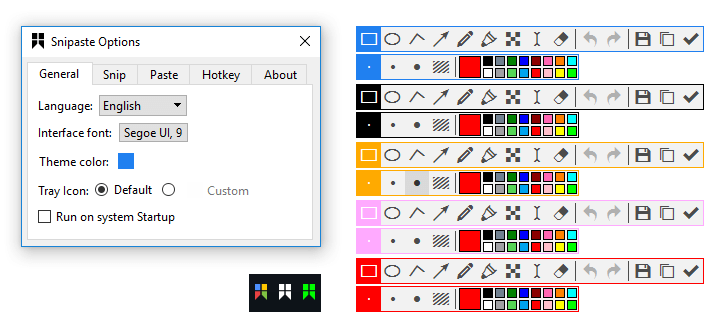
- Theme color, interface font, tray icon, and more
- Hot keys
- Detailed functionality options
- Want more options? Just tell me!
Package Parameters:
/NoDesktopShortcutDo not create Desktop Shortcut/NoStartMenuShortcutDo not create Start Menu Shortcut
eg. choco install -y snipaste --package-parameters="/NoDesktopShortcut /NoStartMenuShortcut"