Home > Software > Tools > Command-line Tools > Dust

Details
- Package ID
- dust
- Version
- 1.2.5
- Downloads
- 10039
- Website
- https://github.com/bootandy/dust
Summary
A more intuitive version of du in rust
Description
Package Parameters
/GNU- Install GNU ABI executable instead of native MSVC ABI.

du + rust = dust. Like du but more intuitive.
Demo
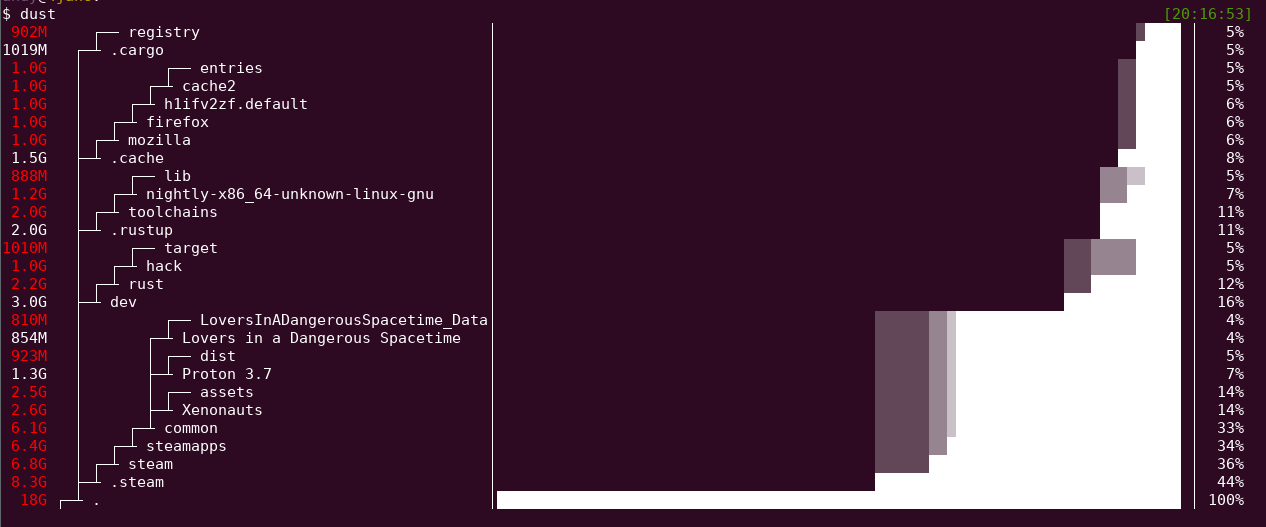
Overview
Dust is meant to give you an instant overview of which directories are using disk space without requiring sort or head. Dust will print a maximum of one 'Did not have permissions message’.
Dust will list a slightly-less-than-the-terminal-height number of the biggest subdirectories or files and will smartly recurse down the tree to find the larger ones. There is no need for a '-d’ flag or a '-h’ flag. The largest subdirectories will be colored.
Usage
Usage: dust
Usage: dust <dir>
Usage: dust <dir>  <another_dir> <and_more>
Usage: dust -p <dir>  (full-path - does not shorten the path of the subdirectories)
Usage: dust -s <dir>  (apparent-size - shows the length of the file as opposed to the amount of disk space it uses)
Usage: dust -n 30  <dir>  (shows 30 directories instead of the default)
Usage: dust -d 3  <dir>  (shows 3 levels of subdirectories)
Usage: dust -r  <dir>  (reverse order of output, with root at the lowest)
Usage: dust -x  <dir>  (only show directories on the same filesystem)
Usage: dust -X ignore  <dir>  (ignore all files and directories with the name 'ignore')
Usage: dust -b <dir>  (do not show percentages or draw ASCII bars)
Note: Apparent-size is calculated slightly differently in dust to gdu. In dust each hard link is counted as using file_length space. In gdu only the first entry is counted.
Comments
Loading comments...